21 November 2022

Send email from Gmail using Python

Configuration of Gmail

As of May 30, 2022, ​​Google no longer supports the use of third-party apps or devices which ask you to sign in to your Google Account using only your username and password. Here is the note on Google Policy on less secure apps.

Step 1:

Login to the Dashboard of Google Accounts:  https://myaccount.google.com

20 November 2022

Schedule Python Scripts with Windows Task Scheduler

Step 1

First let us identify the where python.exe is situated. Open the command prompt and type in "where python". 


16 November 2022

Webscraping of JavaScript Pages using a combination of Selenium & Beautiful Soup

Why Selenium?

Beautiful Soup makes web scraping easy by traversing the DOM (Document Object Model). But it handles only Static Scraping and is not capable of handling JavaScript. Essentially Beautiful Soup fetches webpage from the server without the help of a browser. We get what we see in the "view page source". If the data that we are looking for is available in the "view page source", then Beautiful Soup is sufficient for web scraping. But if we  need data that gets rendered only upon clicking a JavaScript link, then we need to use dynamic web scraping methods In such a situation we first use Selenium to automate the browser and click on the JavaScript link, wait for the elements to load and then use Beautiful Soup to extract the elements.

15 November 2022

Intro to Python logging module - An alternative to print() function

 Logging is generally used to debug our Python code. Many of us (like me) have a habit of using the print() function extensively during the development of a program. Nothing bad in that per se, just that when we want to promote this program to the production environment we must necessarily remove the print() statements. 

There are other reasons too why the print statement is not recommended and its better to use the logging module:

  • The print statement works only if we have access to the console
  • We have no mechanism to write the print statements to a text file for further perusal

08 May 2022

pdb - The Python Debugger / breakpoint

breakpoint versus pdb

Normally we import pdb and then to use the PDB in the program we have to use one of its method named set_trace(). This is how the code goes:
import pdb
pdb.set_trace()

An easier alternative (starting from Python version 3.7 onwards) is to use the built-in breakpoint() function. This helps us to do away with explicit import

breakpoint() # in python 3.7 and above

When we call the breakpoint() function, the default implementation of the breakpoint() function will call sys.breakpointhook(), which in turn calls the pdb.set_trace() function. This is why we do not need to import pdb and call pdb.set_trace() explicitly ourselves. 

27 March 2021

Create a Watchdog in Python

 What is Watchdog in Python

Watchdog is a python module that can be used to monitor file system changes. As the name suggests this module observes the given directory and can notify if a file is created or changed.

Step 1: Import some Stuff

import os
import time
from watchdog.observers import Observer
from watchdog.events import PatternMatchingEventHandler

Step 2: Create the event handler


if __name__ == "__main__":
    # patterns = "*" # the file patterns we want to handle
    patterns = "*.csv" # choose only csv files
    ignore_patterns = ""
    ignore_directories = True
    case_sensitive = True
    # Create the event handler
    my_event_handler = PatternMatchingEventHandler(patterns, ignore_patterns, ignore_directories, case_sensitive)

20 March 2021

Installation of WordPress on localhost

Why install wordpress.org locally on your computer?

We can do all our testing on our local computer , one that doesn’t affect our live WordPress site.

Note: If you install WordPress locally on Windows, then the only person who can see that site is you. If you want to make a website that is available to the public, then you need to have a domain name and web hosting.


What do I need for running wordpress.org locally on my computer?

For Windows users, WampServer is the best way to start off with installation of wordspress.org on your computer? WAMP, is a compilation of Apache web server, PHP and MySQL bundled for Windows computers.

14 March 2021

A Primer to ib_insync - Interactive Brokers Part 8

Why ib_insync ?

While retrieving stock data for multiple symbols asynchronously from the TWS API provided by IB, I found the going a little steep. And here was ib_insync which made the task so very simple for me.

Pls. note that ib_insync is very different from the TWS API provided by IB. The TWS API is the official API created by IB while  ib_insync is created by a team of individuals headed by Guru Ji Ewald de Wit

08 March 2021

Developing a Trading System for TWS API - Interactive Brokers Part 7

What is a trading system?

It is a set of rules that can be based on technical indicators, quantitative methods, fundamental analysis or simply a mix of all or some of them.


What are the elements of a full fledged trading system that can be deployed in Production?

  • An Entry Point
  • A Stop Loss / Trailing Stop Loss
  • An Exit Point

08 February 2021

Scale Order with Adjustable Stop in TWS API - Interactive Brokers Part 6

Scenario:

I am using Python TWS API. For a Stock, I want to place a Limit Order with 2 Profit Takers and 1 Stop Loss. If Profit Taker 1 is hit, then the stop loss should decrease by the commensurate amount (so after Profit Taker 1 is hit, the stop loss quantity is now updated to be equal to Profit Taker 2 quantity). How to do this by packing this entire set of operation's into 1 order?

Solution:

Lets first experiment this scenario with the TWS GUI. For this we will use the Classic TWS.

03 February 2021

Handling Callback data between threads in TWS API - Interactive Brokers Part 5

Scenario:

After I place a market order using the TWS API, sometimes I do not receive the orderStatus callback for a very unusually long time. How then can I find out the status of the placed order ?

Important notes concerning IBApi.EWrapper.orderStatus :

  • Typically there are duplicate orderStatus messages with the same information that will be received by a client. This corresponds to messages sent back from TWS, the IB server, or the exchange.
  • There is no guarantee that an orderStatus callbacks will be triggered for every change in order status. For example with market orders when the order is accepted and executes immediately, there commonly will not be any corresponding orderStatus callbacks. For that reason it is recommended to monitor the IBApi.EWrapper.execDetails function in addition to IBApi.EWrapper.orderStatus.

18 November 2020

Create Bootable Ubuntu USB Drive with Persistent Storage from Win 10

Scenario:

One of my colleagues has a Windows 10 based laptop that uses multiple tabs of Chrome at any given point of time. Primarily for the use of Google Sheets and Google Docs. Besides this she also uses:
• Hangouts for conferencing wherein she needs to share her screen 
• Discord for Team Collaboration
• Skype for messaging
• Open Broadcaster Software(OBS) for audio-video recording
Performance finetuning of Win 10 has helped to improve the overall performance of her windows based laptop. But not as good as she would have preferred it to be. Hardware upgradation for performance improvement was not a factor for consideration . 

16 November 2020

Crack PDF Password using John the Ripper in Ubuntu 20.04

Scenario:

So I have this old PDF file which is password protected and  forgot the password. I tried various permutations and  combinations that came to my mind and they did not work. So what to do?

I started with PDFcrack and almost 3 days later, the program is still running !!!. So that's when I started looking at alternatives. Nothing wrong with PDFcrack per se, just that it is one of the limitations of brute force password cracking. In fact there is even a beautiful blogpost from Ruby Pdf Technologies on some of the intricacies of PDFcrack.

I remembered using something earlier when I was experimenting with Kali Linux. So I went back to the "gold standard" which is called John the Ripper password cracker.  

Types of Password's:

PDFs can be encrypted for confidentiality by requiring either a user password  or a owner password (as in case of DRM). PDFs encrypted with a user password can only be opened by providing this password. PDFs encrypted with a owner password can be opened without providing a password, but some restrictions will apply (for example, printing could be disabled).

14 November 2020

Install Nvidia Drivers & CUDA in Ubuntu 20.04 (in UEFI mode with Secure Boot Enabled)

In the previous article, we have dealt with Installation of Ubuntu in Dual Boot Mode using UEFI. Now lets look at the installation of Nvidia Drivers for the GPU.

Basic Verification's:

First let us find out the graphics card that is presently used by the system. Click on Settings->About. Presently we have "NV138 / Mesa Intel® UHD Graphics 620 (KBL GT2)" installed.


09 November 2020

Dual Boot Win 10 and Ubuntu for system with (SSD + HDD) using UEFI - GPT method

Scenario:

My laptop uses Unified Extensible Firmware Interface (UEFI) and not the good old BIOS. I have a hybrid drive system in my machine, a mix of 256 GB SSD and 1 TB HDD. In my 256 GB SSD drive, I have my Win 10 operating system installed and main programs like Office , Chrome  etc. installed. I use the 1 TB HDD primarily to store data.

I intend to use a Linux based VPS to host my trading strategies on AWS. So how do I create a dual boot in my existing Win 10 machine ?

22 September 2020

Thread Synchronization using Event Object in Python - Interactive Brokers Part 4

This post uses the Interactive Brokers Python TWS API to explain Thread Synchronization using Event Object.

In many applications, sometimes, we need to pause the running of the program until some external condition occurs. You may need to wait until another thread finishes, or another callback is processed. In these situations and and many other similar situations you will need to figure out a way to make your script wait. Three common ways to achieve this are mentioned: 
  1. This is sometimes achieved by using a "trial and error approach using the time.sleep() function in Python". While this may work, it is always a problematic issue in determining the amount of time we need to wait. And using the time.sleep() in such cases is not the right way of achieving the result. 
  2. Another approach is to use flags to arrive at a better approximation in using the time.sleep() function.
  3. Use the Event Object to achieve thread synchronization

07 September 2020

Making blogger a little less painful


Table of Contents

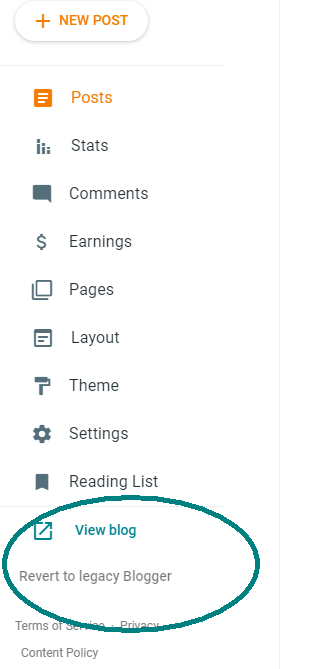
Recently google made an update to blogger for formatting code and inserting anchors in the Compose View itself(instead of HTML view). Yeah, it was just about the time when they came out with this fine separation between "blogger" and "legacy blogger".

The new changes they had incorporated was very good, focused as it was on simplicity . I actually used it to create one blog post which required the use of Table of Contents right from the "Compose View". I also used it to insert my Python code right from the "Compose View". Imagine the savings in time for somebody who makes a blog post daily ?

Suddenly a few days later all of it vanished as mysteriously as they appeared. Another Google+ ??? (oh yeah, that much touted alternative to Facebook)

Google seems to have done a veto on their recent updates to blogger. But yet I prefer google over some other blogging options like Medium becos in the near future google corporation don't need to worry about monetizing blogger , unlike the corporation run by Evan William's. ( He is the same guy who started blogger too , which was latter purchased by Google ).

So I began to think - How can I make blogging more easy on blogger instead of switching to another platform. Maybe google might bring those feature back, or maybe they wont. We don't know. So lets see what we can do for now.

I would like to cover the following issues which are of concern to me:

Formatting Source Code:

I have already dealt with formatting code in one of my previous posts. Check out one of my earlier post - Syntax Highlighter for Source Code on Blogs . This deals with code-prettify and unfortunately for us this is archived and is no longer maintained. So sooner than latter, we will have to look at alternatives.

The one I found most helpful was the use of gist. I have been using GitHub for a couple of years now and so it was the logical to continue with it.

10 August 2020

Advanced Techniques in TWS API - Interactive Brokers Part 3

In the first part of the blog on the TWS API of Interactive Brokers, I have dealt with the Installation of TWS API on a Windows machine for Anaconda distro.

In the second part of the blog, titled Fundamentals of TWS API, I have dealt with the essentials to get started.

Now in this third part I seek to explore the concepts like using a scanner, retrieving the OHLCV data and writing it to a CSV file, Hedging a Futures Contract with Options and many others including a fully functional sample trading system.


Table of Contents :


Optionable Contracts in NSE using the Scanner

Let's get to the point straight - The TWS API is just an interface to the TWS. If you are having problems defining a scanner viz the API , always make sure you can create a similar scanner using the TWS or the Mosaic Market Scanner.

24 June 2020

Fundamentals of TWS API - Interactive Brokers Part 2

Generally Interactive Brokers releases the installer for both the TWS API and IB Gateway simultaneously. For this blog I will use TWS API ( Version: API 9.79 Release Date: Feb 05 2020 ) and not IB Gateway. Check out my previous blog post for detailed installation guide of TWS API on Win 10 Machine that uses the Anaconda Distribution for Python.


IB also has a host of API's. A recent one that they added is a REST based API which they refer to as Client Portal WebAPI . However this blog post deals solely with the TWS API


                            Table of Contents :

The general operation of the TWS API application is:

  1. Establish connection with IB server.
  2. Request information from IB server or execute an action
  3. If a response is provided by the IB server, then receive the response and process the response
  4. Repeat steps 2 & 3 until all the required information has been received and all the operations have been executed.
  5. Terminate the Connection with IB server.

30 April 2020

Installation of TWS API - Interactive Brokers Part 1


One advantage of Interactive Brokers (referred to as IBKR or just IB hereafter) over Kite Connect or Upstock API is that IB provide's a Paper Trading Account.

If you are an Individual, you can signup for the free trial ofInteractive Brokers . This basically gives you a "Paper Trading Account" with access to all the IBKR platforms for a couple of months including the TWS and Mosaic platforms. For the purpose of live testing our trading strategy , we have access to  Market Data ( Delayed by 10-15 minutes) and the API for retrieving data  (Not all Data) and placing orders. So yeah, the trial version of IB provides "Limited Functionality" for testing your strategies using the API. 

Some of the things that you can do with ApplicationProgramming Interface(API) from IBKR  :
  • Automate your strategies
  • Create a custom trading terminal
  • Develop a Screener
  • Experiment with your own Trading Indicator
Basically if you are reading this, you know why you have opted for IBKR.

Its is important to note that there are other third party Libraries in Python like ib_insyncIbPy and IBridgePy. But these have been developed well before the release of the Python Native API which is developed by IBKR . Only the API developed by IBKR is officially supported by IBKR.  For more information on the API, Check the YouTubelink for the official videos of TWS Python API

It is always helpful to get a feel of the web interface of IB which they refer to as Client Portal and Trader Work Station(TWS) before we get started.